Web Frontend
repartee includes a built-in web frontend that runs alongside the terminal UI. Access your IRC sessions from any browser — desktop or mobile — with real-time bidirectional sync.
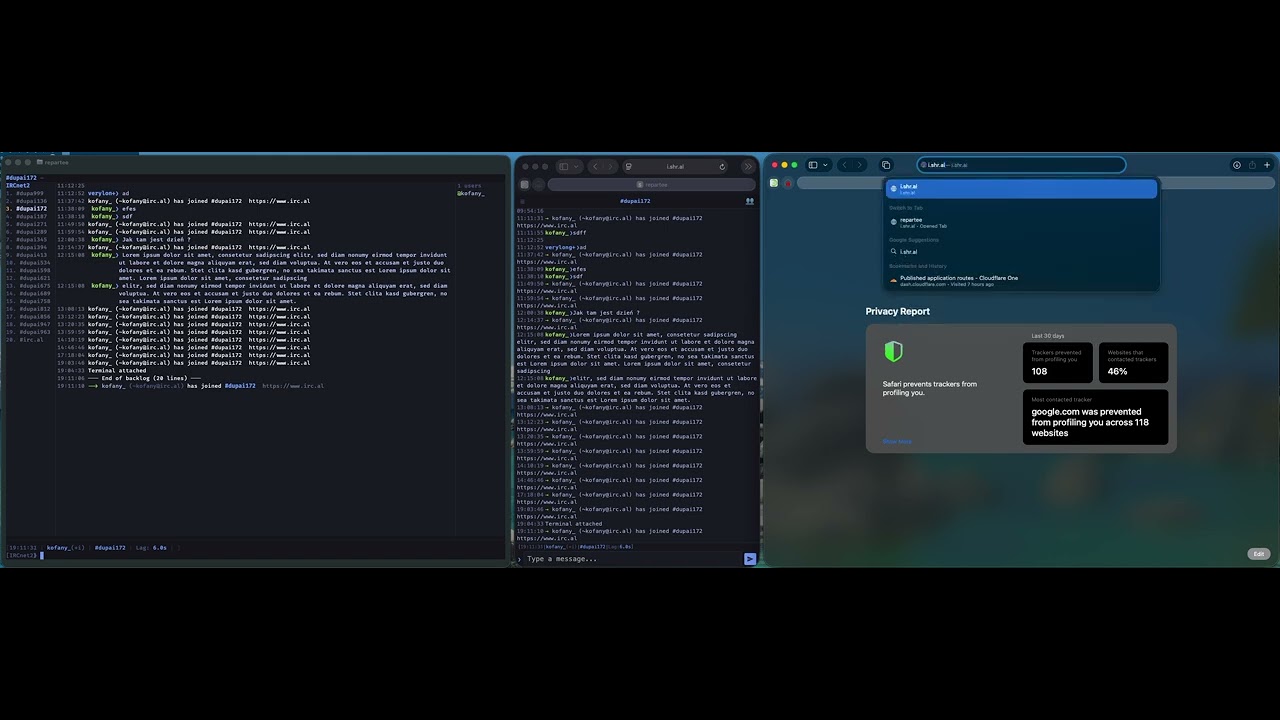
TUI (left) | Mobile web (center) | Desktop web (right) — 1:1 state sync.
Enabling
The web frontend is disabled by default. To enable it, set a password in ~/.repartee/.env and enable it in config.toml:
1. Set the login password:
echo 'WEB_PASSWORD=your-secret-password' >> ~/.repartee/.env
2. Enable in config:
[web]
enabled = true
port = 8443
repartee auto-generates a self-signed TLS certificate on first launch. Open https://localhost:8443 in your browser and accept the certificate warning.
Configuration
All web settings live under the [web] section in config.toml and can be changed at runtime with /set:
| Setting | Default | Description |
|---|---|---|
web.enabled |
false |
Enable the web server |
web.bind_address |
127.0.0.1 |
Bind address (use 0.0.0.0 for LAN access) |
web.port |
8443 |
HTTPS port |
web.tls_cert |
(auto) | Path to TLS certificate (PEM). Empty = self-signed |
web.tls_key |
(auto) | Path to TLS private key (PEM). Empty = self-signed |
web.password |
(from .env) | Login password (set via WEB_PASSWORD in .env) |
web.session_hours |
24 |
Session duration before re-login required |
web.theme |
nightfall |
Default theme (nightfall, catppuccin-mocha, tokyo-storm, gruvbox-light, catppuccin-latte) |
web.timestamp_format |
%H:%M |
Timestamp format (chrono strftime syntax) |
web.line_height |
1.35 |
CSS line-height for chat messages |
web.nick_column_width |
12 |
Nick column width in characters |
web.nick_max_length |
9 |
Max nick display length before truncation |
Nick coloring settings live under [display] but are also synced to web clients:
| Setting | Default | Description |
|---|---|---|
display.nick_colors |
true |
Enable per-nick deterministic coloring |
display.nick_colors_in_nicklist |
true |
Also color nicks in the nick list sidebar |
display.nick_color_saturation |
0.65 |
HSL saturation (0.0–1.0) |
display.nick_color_lightness |
0.65 |
HSL lightness (0.0–1.0), lower for light themes |
Settings changed via /set web.* or /set display.nick_color* apply immediately to all connected web clients.
Features
The web frontend provides full 1:1 parity with the terminal UI:
- All buffer types — server, channel, query, DCC chat
- Real-time sync — messages, nick changes, joins, parts, quits, topic changes, mode changes
- Bidirectional buffer switching — switch a buffer on web and the TUI follows, and vice versa
- Command execution — run any
/commandfrom the web input (output visible on web) - Tab completion — nicks,
/commands, and/setsetting paths - Nick coloring — deterministic per-nick colors synced from server settings, same HSL algorithm as TUI
- Nick list — grouped by mode (ops, voiced, regular), away status, per-nick coloring (toggleable separately)
- Activity indicators — unread counts and color-coded activity levels
- Mentions — highlight tracking with mention count badge
- Theme picker — switch themes live (5 built-in themes)
- Multiline input — paste multiline text, each line sent separately
- Persistent sessions — page refresh reconnects automatically (session stored in browser)
- Embedded shell — full terminal in the browser via beamterm WebGL2 renderer. Separate PTY per web session (no resize fighting with TUI). FiraCode Nerd Font, mouse selection with clipboard, Ctrl+/- font resize, Ctrl+C (SIGINT), clipboard paste with bracketed paste mode
Desktop Layout
The desktop layout mirrors the terminal UI:
┌─────────────────────────────────────────────────────┐
│ Topic bar                                           │
├──────────┬─────────────────────────────┬────────────┤
│ Buffers  │ Chat area                   │ Nick list  │
│          │ 14:23 @ferris❯ Hello!       │ @ferris    │
│ (status) │ 14:24  alice❯ Hey there     │  alice     │
│ 1.#rust  │                             │  bob       │
│ 2.#help  │                             │            │
├──────────┴─────────────────────────────┴────────────┤
│ [kofany(+i)] [#rust(+nt)] [Lag: 42ms] [Act: 3,4]   │
│ ❯ [Message input...                           ] [➤] │
│ [● ● ● ● ●] theme picker                           │
└─────────────────────────────────────────────────────┘
Mobile Layout
On screens narrower than 768px, the layout switches to a mobile-optimized view:
┌──────────────────────────┐
│ ☰  #rust (+nt) — Welc… 👥│  top bar
├──────────────────────────┤
│ 14:23 @ferris❯ Has any…  │  inline nicks
│ 14:24 alice❯ Yeah, it's… │
├──────────────────────────┤
│ [kofany|Act: 3,4,7]      │  compact status
│ [Message...          ] ➤  │  input
└──────────────────────────┘
Mobile features:
- Inline chat — nicks appear inline with the message (no right-aligned column) to maximize horizontal space
- Slide-out buffer list — tap the ☰ hamburger or swipe right from anywhere to open the channel/buffer list
- Slide-out nick list — tap the 👥 button or swipe left from anywhere to open the nick list
- Auto-close panels — tapping a buffer in the slide-out switches to it and closes the panel automatically
- Touch-friendly — large tap targets, swipe gestures, no accidental horizontal scroll
- Viewport fitting — uses
100dvhto properly fill the screen on iOS Safari and Android Chrome (accounts for browser chrome) - No auto-zoom — focusing the input field does not trigger iOS Safari's auto-zoom behavior
- Notch-safe — respects
safe-area-inset-bottomon iPhones with home indicators
Custom TLS
For production use (or to avoid browser certificate warnings), provide your own TLS certificate:
[web]
tls_cert = "/path/to/fullchain.pem"
tls_key  = "/path/to/privkey.pem"
Let's Encrypt certificates work out of the box.
Remote Access
To access the web frontend from other devices on your network:
[web]
bind_address = "0.0.0.0"   # listen on all interfaces
port = 8443
Then open https://your-machine-ip:8443 from your phone or another computer.
Security
- HTTPS only — all traffic is encrypted via TLS
- Password authentication — HMAC-SHA256 verified login
- Rate limiting — brute-force protection with progressive lockout
- Session tokens — time-limited, stored in browser localStorage
- No external dependencies — the web UI is compiled to WASM and embedded in the binary; no CDN requests, no external scripts